Archive for September 3rd, 2004

MMOG evolution

I’ve had this conversation with quite a few people at this point, so this is perhaps reiteration. Oh well, such as it is…

Every single massively multiplayer game I’ve ever participated has gone down a very similar road, eventually. And I’ve played in ALOT of them. This starts all the way back into the very first ones, including the long series of MUDs, MUSHes and MUXes that are out there.

The way I see it, they all start out with some ‘hook’. In the early days of MUDing, it was a new type of mob, or in the cases of the social MU*es, some new area that has been built, or someplace to explore, a new code or program you can utilitize to customize the environment, or whatever. Some of the oldest of them, like TIM or similar, had a large following of players and a just immense area to explore, fun objects to play with and trigger, and so on.

The graphical era moved in, so games like Ultima Online, Everquest, Asheron’s Call began to suck up the players. And the current influx of games is immense. There is alot of room in the market for them, and they continue to be successful, but eventually that will peak out as well.

The interesting part is what happens to ALL of them once the initial push wears off. They all become, at the core, a social construct. They are supported by the community that has developed there, and that continue to visit to maintain the contacts and touch points with all the people they’ve come to know and call friends. With the MUDs and MUSHes, it stopped being a game to explore and play, and just became an extended chat room. In the case of the pay-to-play style games, they continue to update content and exist as long as the player base that continues to visit is strong enough to keep paying the bills. Thats a really important point.

So no matter how much you may want those games to return to their ‘glory days’ of major activity and interactivity, you eventually have to embrace their new role.

One thing to keep in mind. I’m not saying that these games become ‘static’ or unchanging shadows of what they once were. While that may be true in some cases, I think that ones that have a dedicated development staff that believes in the game will continue to invest (once again, so long as they are able to continue being paid) in keeping the content fresh, updating on a monthly or at least regular basis, and keep the people who continue to play drawn in to the world. If they didn’t, it would eventually die. I don’t believe even the social constructs survive a pure stasis.

So what is the point of all this? It kind of sounds like I’m nay-saying the whole concept of MMOGs. Quite on the contrary, actually. What I’m saying is to embrace them for what they are. Every single one of them has formal or informal concepts of guilds, allegiances and other manners in which their players group up and have fun together. FIND A GOOD ONE! I think you’ll find that the core group of those players who’ve become fast friends over the time spent on these games will move as a unit from game to game as their interests vary. In fact, in some cases, participating in multiple games at the same time to keep the content fresh for them. I believe with MMOGs, eventually, it stops being about the game you’re playing, and eventually becomes about the PEOPLE you play them with.

And quite frankly, thats just FINE with me.

Share

Compositing

I’ve mentioned making wallpaper images using a technique I called “compositing”. I’m sure it has some other name that makes sense just as well, but thats what I call it. For those who crave such a technique, I’m happy to share. I suppose I’ll just discuss it in the general sense, and then provide a very specific example from one of the images in the gallery.

Honestly, this isn’t brain science or anything, just a whacky technique thats easy and produces some (imho) very nice images to look at. Ok, basic principle.

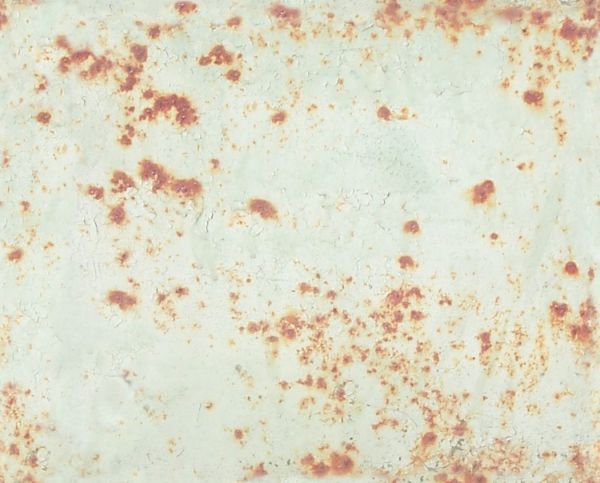
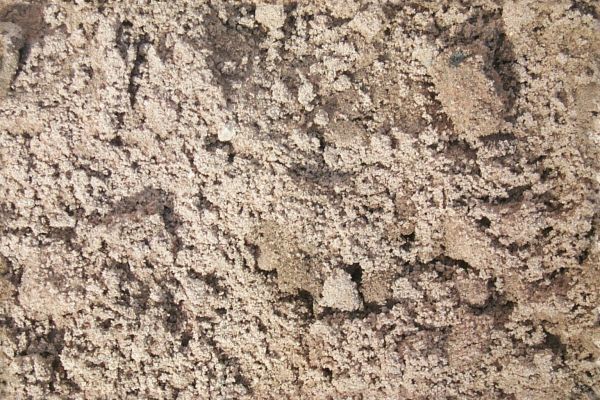
The first task is to go browsing the Intranaut for images that are appealing to you. The ones that I find that work best are pictures of natural settings with one consistent structure to the whole image. As some examples, I will show you a picture of some rusted metal, some sand, a rock wall and the side of a dirty car. Again, notice that each image doesn’t contain a huge variety of content. Each sticks to one theme, and has consistent elements throughout.

These images aren’t really all that notable in and of themselves. They key is in the layering. Next take your favorite image manipulation program. Make sure it supports layering, and having each layer act as a filter. Personally, I use Paint Shop Pro, and have for years. To each their own.

Next: Open your graphics program of choice, and open a new image of whatever size you want. I almost always start with a blank, black 1600×1200 image, figuring that I can scale down from there to whatever size I want later. Open all your ‘sampled’ images as well, and RESIZE them to the same size as your target image. I generally ignore scale here, it isn’t important in the sampled images.

Start with a base color. Pick a color that is generally pleasing to your eye, and just paint that color into your background layer as the base color. Now, for each of your sampled images, copy and paste it into your target image as a new layer. With each of these layers, change the filtering type and percentage until you arrive at something that looks good to you. Repeat for each image.

What I mean by ‘filtering type’ is how the new layer affects the image. Yes, it is a picture and you’d think you’re just overlaying that image onto your background color with a certain opacity, big deal. Well, yes and no. The filtering type ‘Overlay’ is certainly an option, but there are many others. For example: Darken, Lighten, Hue, Luminance, Multiply, Hard Light, Soft Light, Dodge, Burn, etc. Each of these filtering types will take your sampled image, and affect whats behind it a different way.

I normally spend the majority of my time in this step. With each layer, I go through ALL the filtering types, and with each type, vary the percentage of effect (opacity, to use the same analogy) from zero to 100%. Even if I find something pleasing to the eye, I always go through all the filter types anyway. I come up with a mental list of the two or three I liked, and once I’ve completed the whole list, I go back and reevaluate the couple that were the most appealing.

Once thats done, lock down the layer, and go get the next example image. Repeat until you’re done. There are occasions when I don’t use one of the sampled images because none of the filters strike me, or occasionally change the order of the layers to get a different result. Experimentation here is key, it will reward you eventually. I may also, as a final step, introduce a darken/lighten layer, or a contrast type thing to improve the overall brightness of the image, but usually not. Thats it!

So for a specific example, check out the moss image in gallery three. The example images I selected earlier are the ones used to make this one. Here’s the exact process:

Background color is a dark green (#004040)
First layer is the old metal image, Burn filter, 100%
Second layer is the sand one, Burn filter, 16%
Third layer is the brick wall, Hard Light filter, 26%
Fourth and final layer is the auto dirt one, Dodge filter, also at 100%

voila. I’m particularly pleased with that one. It took about 5 minutes (quite literally) to make. It all just bolted together very nicely. Please feel free to comment or add your own thoughts about this if you like. I’m curious what other sorts of magical techniques people use to make nice backgrounds and wallpapers.

What I think is the most appealing about this technique is that since each of the images used is itself a very natural (or pseudo natural) image that could easily occur in nature, the resultant image also looks very natural. The moss one in particular reminds me of what you might see on a moss covered rock underwater, with some specular highlights that might be some sort of phosphorescent part or little glowing thinger. Also, once you’ve seen the images used to create it, you can usually just about pick out the effects each of them had, but without that knowledge there really is no discernible “order” to things, or any way to really see what makes up the image. Dig it. Give it a shot!

Share

iPod

Ok, so I went and ordered (and today received) an iPod. 20g version. I feel so dirty. Say whatever else you want about Apple and their products, but they have product marketing and packaging and presentation DOWN PAT. All their products (ok, maybe there are a few exceptions) are pretty to behold. The iPod itself is light, compact and holds a buttload of music. Battery life and other such measures will become apparent pretty soon.

At the moment I’m downloading some 2000+ songs to the damn thing. To be more precise, I’m downloading 2225 songs that will take up 13.37 gig of space. As I continue to rip new stuff off my CDs, I’ll fill the rest, but this is a good start, to be sure. I also ordered a dock (I’ll most likely end up using that at work or in the data center when I want to keep it charged, and eventually get little speakers (or just take ones I already have to use with it. We’ll see. Convenient portable music, blah blah blah. I’ve mentioned in previous posts that music is a pretty central part of my life, and that I couldn’t very well live without it. I’d go so far as to say that when I don’t have music in the background, my life is less full, less rich. It feels empty when it isn’t there, like something’s missing.

Now that I’ve blathered on about the philsophy of this for a bit, I suppose I’ll give some specs. First, all my music that I store for any length of time (barring stuff that I’m “testing” to see if I want to buy), is ripped from my own CDs. This is a personal decision, I realize. Many see the Internet as a mechanism for free music. More power to them. In fact, I have a theory about this. It is pretty indisputable that there is a percentage of the population that downloads music for free from the Internet without paying. In fact, I freely admit to doing just that (under the above listed caveat). However, I believe that there is a portion of the population (and it includes me, so I know the portion is at least *that* big), that only did so because they had no mechanism to otherwise support their ‘music habit’, being in college, jobless, or under some other similar financial duress, BUT FULLY INTEND to purchase the (rights to the) music once their resources are restored or gained. I want to support the artists that produce the wonderful stuff that is so central to my life. The same holds true for computer games, movies or really any other form of media that has become ubiquitous in this day and age. I don’t necessarily agree with the manner in which publishers manage the rights and profits of those artists, but that is an evil (I think) that will fix itself. Look at me, guys. I AM YOUR TARGET MARKET. I am the one who WILL pay (eventually) if the quality of the product is sufficient.

Boy, that turned into a rant. Oh well. In any case, music specs. I use EAC for ripping to WAV, and LAME for conversion to MP3. with the following settings:

  • --alt-preset standard -Z
  • 160Kbits/sec
  • VBR
  • High Quality

Argue all you want. This is the right balance point for me for quality/file size. So instead of the advertised 5000 songs, I will probably only get about 3000. Phew. Wow, I feel so slighted.

I was pleased to see that it supports behaving as a ‘drive’, so I can just copy files over to it, however, in order to get MUSIC to play, you have to use one of the supported programs so that its internal indexing/playlist/database is updated and can “see” your files. Thats an acceptable balance, I think. I was disappointed to see that the version of IEEE1394 in my Audigy doesn’t fully support the RFC, and as such, won’t work with the iPod for file transfers. While USB is working fine, I’m a geek, and I want the things I buy to work. Is that so much to ask? I wasn’t even aware that the Creative Labs implementation wasn’t full until this didn’t work right. Ah well.

So far so good. Music quality is good, no skips or jumps from motion, volume goes to VERY loud. earbuds are adequate (I’ve never been fond of them, the little bastards). Installation was quick and painless. Software is intuitive and easy to navigate. I think I made a good choice.

Share
Return top